Party Finder
This exclusive system,allows players to find a group easily and quickly, creating their own lobbies and much more.It includes several customized features, thatc...
This exclusive system,allows players to find a group easily and quickly, creating their own lobbies and much more.
It includes several customized features, thatcan set up according to preference.
The system can be accessed by pressing the key"O", or through the icon on the minimap.
Creating a Lobby:
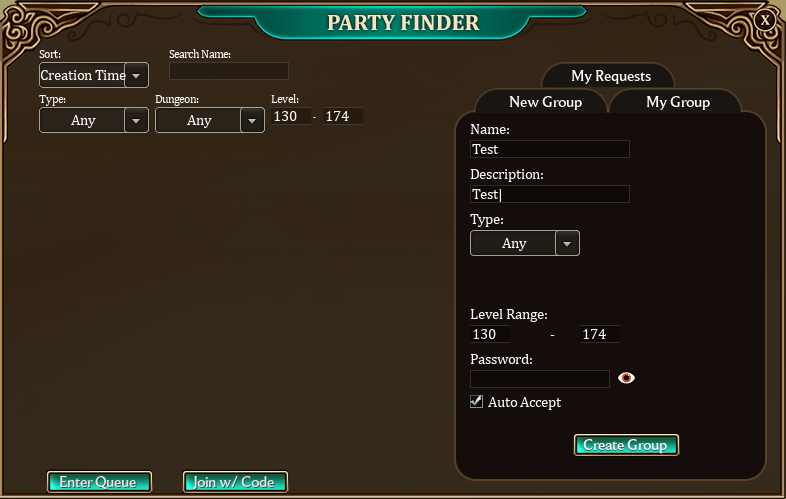
After accessing the system, just need toclick on "Create Group", and configurethe lobby settings.
Through these settings, users can define which level range can join, set a password, and even decide whether it will be a lobby where a join request is required.
These settings include:
Name: The name of the lobby.
Description: A description of the groups activities.
Type: The type of activity. (Exping, Dungeon, etc.)
Level Range: Minimum and maximum level to join.
Password: A password to join the lobby or to be able to send a joinrequest.
Auto Accept: Determines whether players will need to send a request to join or if they can enter automatically.
The default Party Systemworks independently,and the use of the Party Finder is optional.
To create a lobby, the player must either be alone, or be the leader of his current party.
After creating a lobby, the Party System and Party Finder starts to work together, and all party members will be automatically added to it.
As soon as created, lobby will appear in the lobby list, on the left side of the window.
MyLobby:
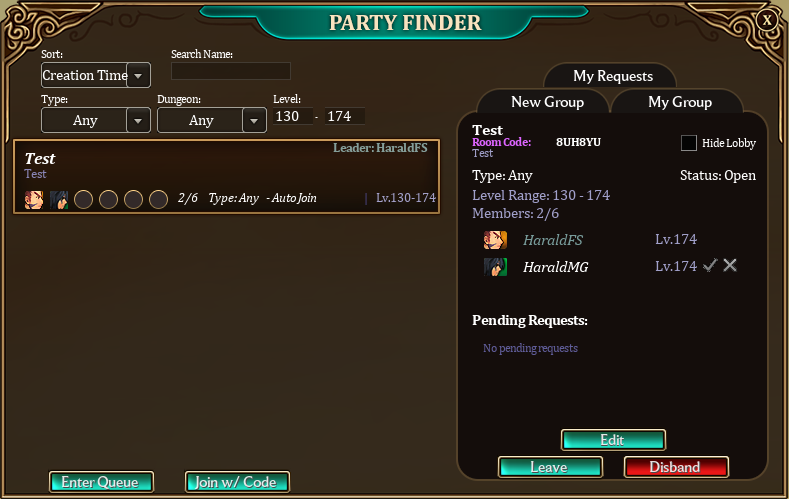
After creating or joining a lobby, it can beaccessedthrough the "My Group" tab.
In this section, the party leader can manage and edit the lobby, check if there are any join requests, and also hide the lobby from the list if want.
Each lobby also has a code that only the leader can see. By clicking on this code, it will be copied.
This code can then be shared with other players, allowing them to access the lobby more quickly without having to search for it.
When a request is received, the leaders Party Finder minimap icon will pulse,and it will only stop once the leader has viewed the request.
A message will also be received in the chat, showing that a request was received.
If the game window is minimized, a Windows notification will be sent.(If the Windows notifications are enabled)
Its worth noting that if the leader disbands the lobby though the Party Finder, the party will still remain active through the regular Party System.
In cases where the leader leaves or go offline, the lobby leadership will be automatically transferred to another player of the group.
Note thatthe groupleader can't accept requests while inside a Dungeon, but the request will remain listed, and can be accepted as soon as he leave.
Starting a Dungeon:
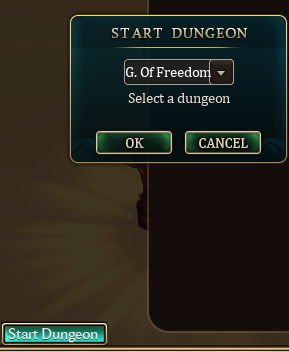
Through the Party Finder, it is also possible to quickly start a Dungeon, without having to go to the NPC Dungeon Master.
To do this, the leader simply needs to set the lobby type to "Dungeon," and a button to start a dungeon will appear.
After clicking OK, a request will be sent to the other group members to join the selected Dungeon.
Joining a Lobby:
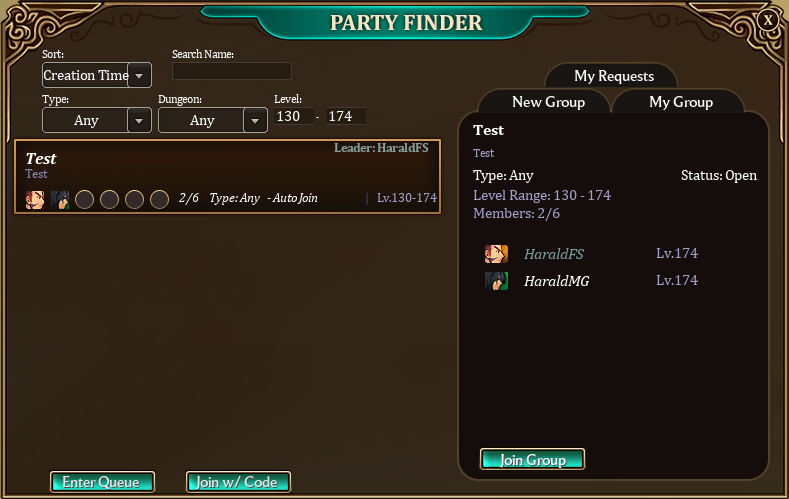
In the Party Finder, all active lobbies will be listed, and can be filteredaccording to user preference.
After find one that matches the desired specifications, need to click on it and then click "Join Group."
It is also possible to request to join using the lobby code, by clicking the "Join w/Code" button.
Only the lobby leader has this code, and can share it with other playersif want.
If the lobby has "Auto Accept" enabled, will join automatically, otherwise, a join request will be sent to the group leader.
It is alsopossible to "Left Click" on the party leaders name in the lobby list or in the lobby itself, which will automatically add his nickname tothe chatbox to send him a message.
Note that you can't join lobbies that are already in a Dungeon.
But if its not a group with Auto Join enabled,you can send a request, and the leader will be able to accept it as soon as he leave the Dungeon.
My Requests:
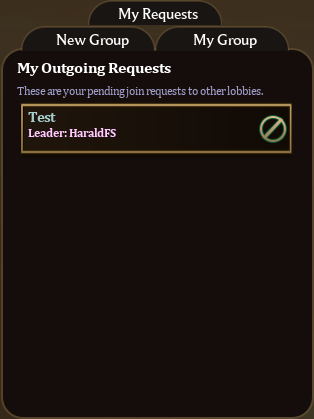
In this tab, it is possible to view or cancelpending requests to join lobbies.
It is alsopossible to "Left Click" on the party leaders name,which will automatically add his nickname tothe chatbox to send him a message.
Lobby Queues:
The Party Finder also includes a Queue System, where the user predefines certain options through filters, and the system will automatically search for a group.
Using this feature is simple,the user sets the filtersdisplayed at the top of the lobby list, and then clicks "Enter Queue."
A window will open showing the search details, and once the system finds a lobby that matches the desired specifications, the player will be added to the group.
Its important to note, that this system only searches for groups with the "Auto Accept" option enabled.
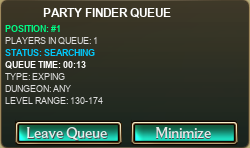
When the system doesnt find any available groups matching the specifications, it searches for other players who are also looking,and then automatically creates a lobby if the specifications match.

[](https://forum.losttale.com/index.php?/party-finder/#)
-
-
-
-
-